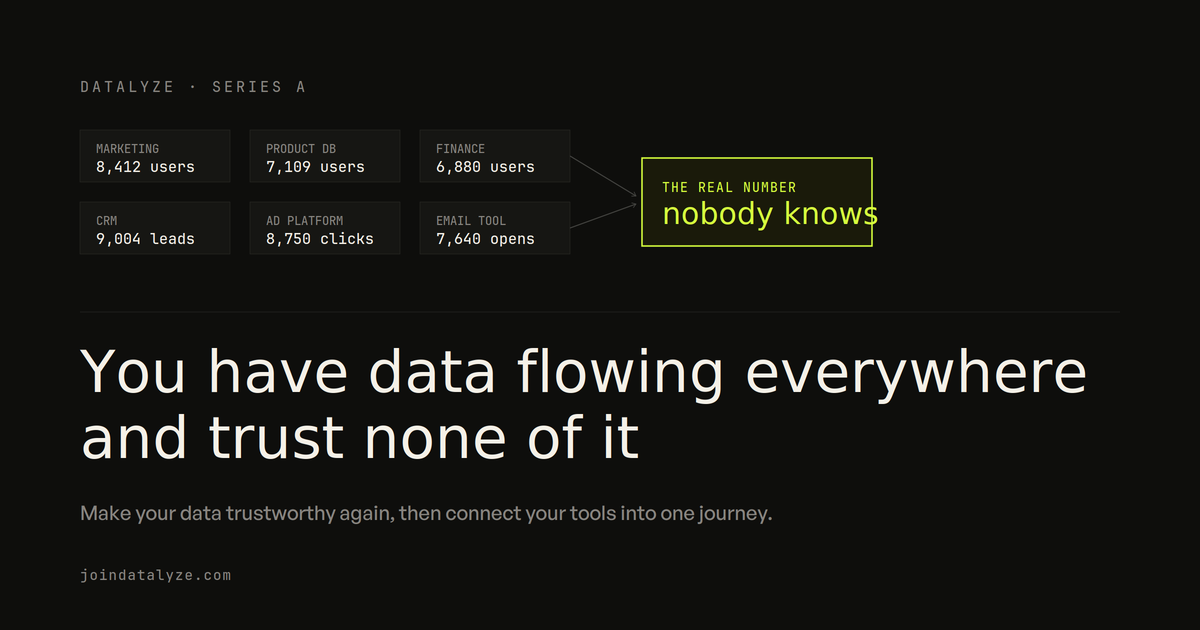
You have data flowing everywhere and trust none of it

The short version
You've hit product-market fit. Thousands of users. You've got a product analytics tool already, Mixpanel or PostHog or Amplitude, plus a CRM, an email tool, and two ad platforms. All of it wired up whenever someone needed a number, none of it planned properly.
So now you don't trust any of it. Marketing dashboard says one thing, the product database says another, finance says a third. And even inside your one analytics tool, the numbers feel inaccurate.
First you make the data you already have trustworthy again. Then you connect your tools into one view of the user journey, from the ad click to the paid plan. The order matters, because unifying broken data just gives you broken data in one place.
If you don't have any analytics set up yet, this isn't your starting point. Read the setup-from-scratch post first and come back once you're past that.
Why do you have to fix your existing data first?
Before you connect a single new tool, you have to trust the data you already have. And most teams at this stage don't, for one reason above all others.
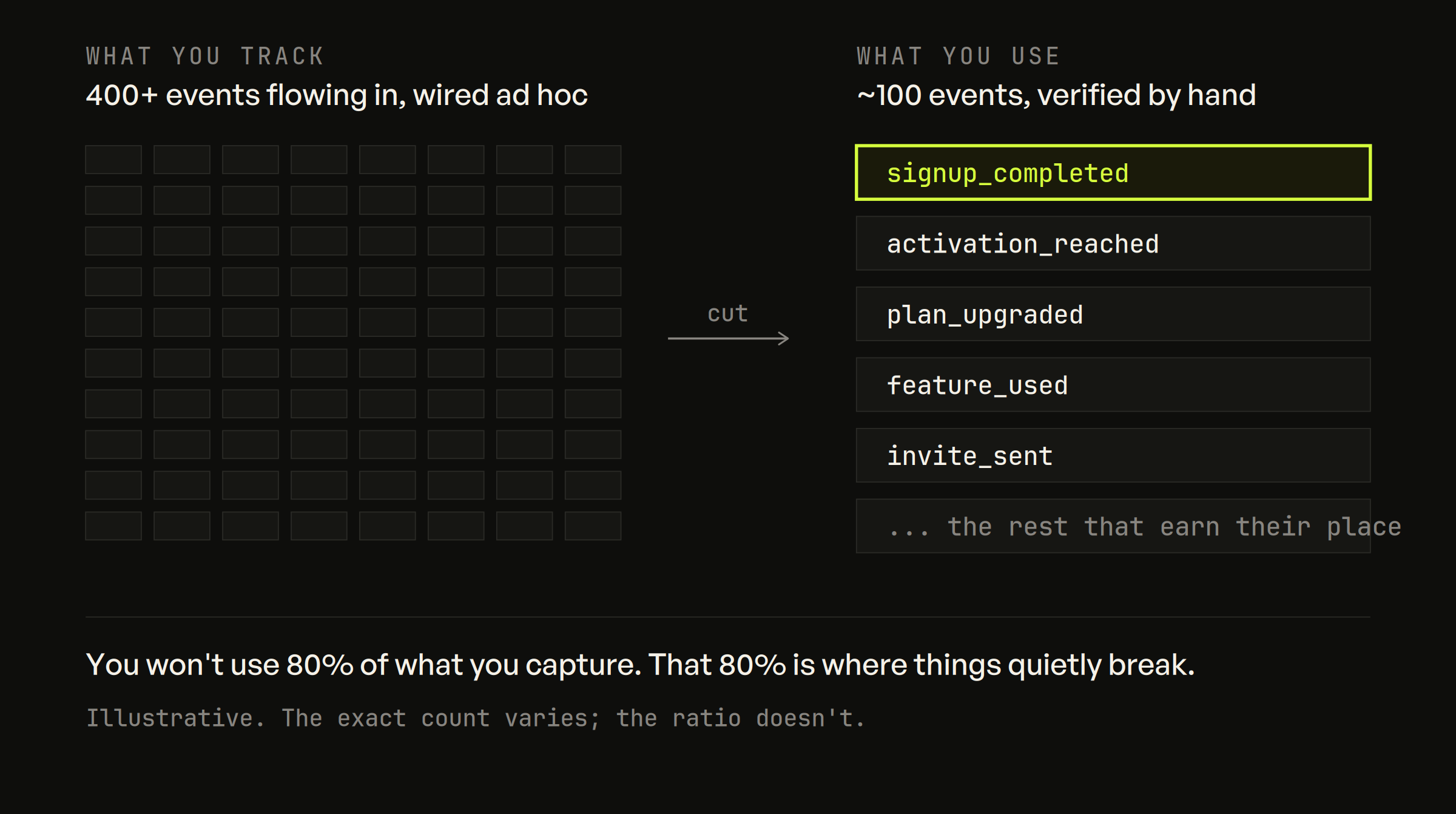
You're tracking too much.
If you're firing an event on every click and every button, that's the root problem, and it never scales. I've written about this at length in the analytics debt post. Even a complex product rarely needs more than around 100 events. You will not use 80% of what you're capturing. It's noise, it's a maintenance burden, and it's the reason things quietly break and nobody fixes them.
So the move is often to cut back hard, sometimes to start the tracking plan over. With a lean event set, you can verify it by hand. Go through every event. Find the ones firing at the wrong time, or with the wrong property values, or not firing at all. Sit with your dev team and fix them one by one. It's slow and unglamorous and it's the single most important thing you'll do in this whole project.
If you are rebuilding the plan, get the structure right while you're in there. I've got a full walkthrough on building a tracking plan. And while you're auditing, check three more things that break silently:
One user, one profile. Identity stitching is the thing people get wrong most. The same person shows up as two profiles, one anonymous and one identified, and they never merge. It usually happens when identify isn't being called properly, or when your marketing site and your app live on different subdomains and nothing links the two. Find these and fix them, because every per-user number is wrong until you do.
User properties actually set and updated. Plan tier, signup source, account status. If these are stale or missing, your segments are lying to you.
Event structure that makes sense. One event with properties for variations of the same action. Separate events for things that are genuinely different. Get this wrong and every funnel you build later is a fight.
Skip it and everything you build on top sits on sand.
A verification pass is the kind of thing I do fast because I've done it a hundred times. If you'd rather not spend a month auditing events by hand, book a call and I'll take a look at what's actually firing.
None of this is fun. But skip it and everything you build on top sits on sand.
A verification pass is the kind of thing I do fast because I've done it a hundred times. If you'd rather not spend a month auditing events by hand, book a call and I'll take a look at what's actually firing.
Why is getting the data in only the easy half?
Say your tracking is clean now. Every per-user number you pull, you trust. Good. Now the second problem: your other tools.
Your ad spend lives in Google and Meta. Your leads and account data live in a CRM. Your billing lives in Stripe. Your product behavior lives in Mixpanel or PostHog. Six systems, six half-pictures, and no way to follow one user across all of them.
How hard it is to fix depends heavily on which product analytics tool you're on.
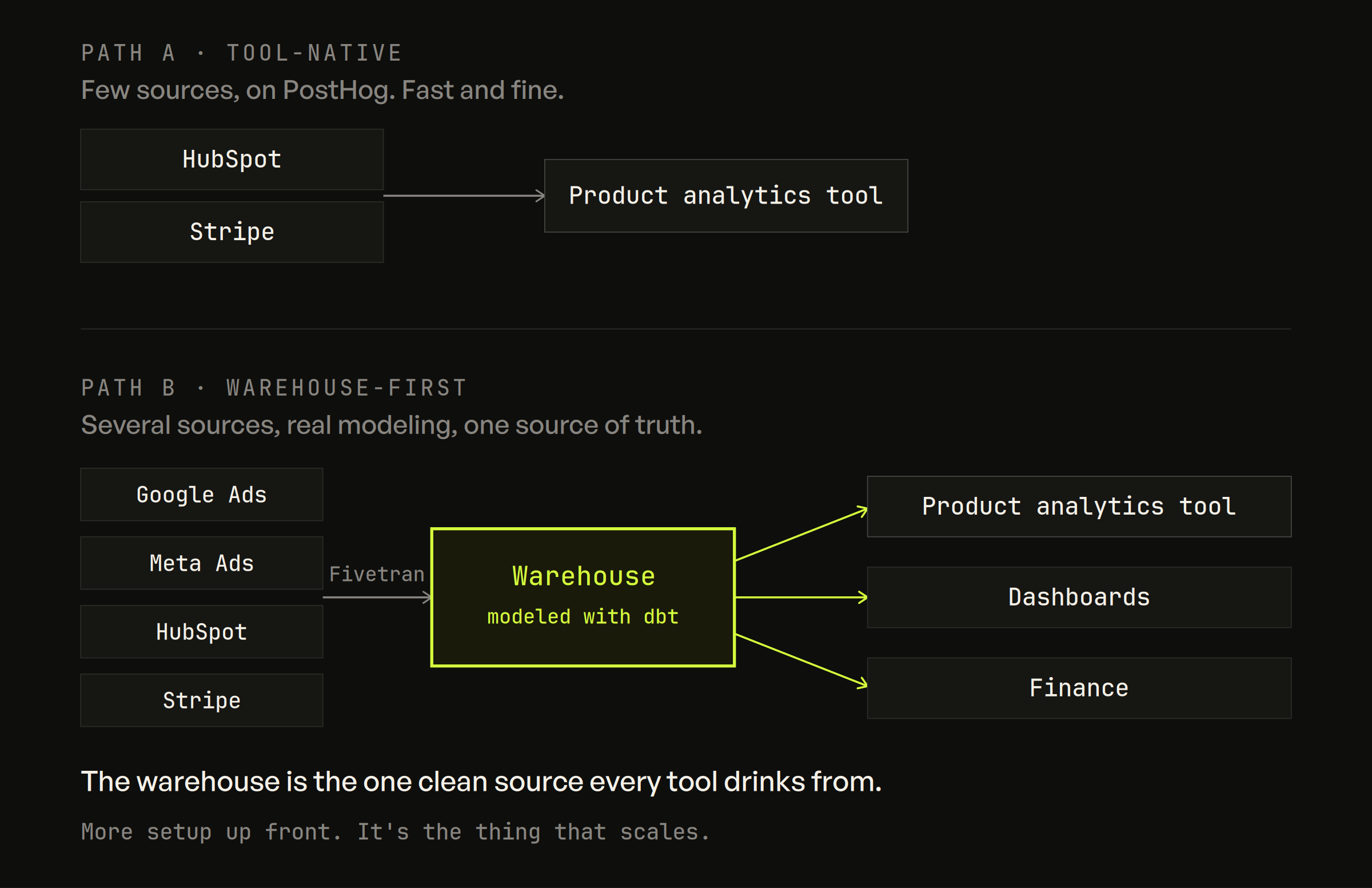
If you're on PostHog, this is the fast path. PostHog can connect external sources directly, HubSpot, Stripe, Salesforce, your Postgres database, even an external warehouse, and pull that data in alongside your product events. Then you query across all of it with SQL, using their HogQL. This is genuinely one of the best reasons to be on PostHog.
If you're on Mixpanel, you've got native warehouse connectors. The common belief is that Mixpanel can't do this, and it's out of date. Mixpanel can natively pull data in from Snowflake, BigQuery, Databricks, Redshift, or Postgres on a recurring sync, no code. What it won't do is reach straight into Google Ads or HubSpot for you. So the shape is one step longer: land your ad and CRM data in a warehouse first, then let Mixpanel's connector sync it in.
Amplitude takes a third approach, running queries against your warehouse rather than pulling the data into itself.
To get ad and CRM data into a warehouse in the first place, you use a pipeline tool. Fivetran and Airbyte are the two standards, and both have ready-made connectors for Google Ads, Meta, HubSpot, and Salesforce that dump into BigQuery or Snowflake. Point them at the source, point them at the warehouse, done.
Which brings me to the approach I recommend regardless of which tool you're on: go through a warehouse. BigQuery, Snowflake, whatever you already have. Land everything there first. Model it into the right shape. Then sync from the warehouse into your product analytics tool, or query it in place.
The warehouse is the one place every tool can drink from. PostHog connects to it. Mixpanel connects to it. Your dashboards connect to it. Your finance team connects to it. Pour the data into a warehouse once, clean, and every downstream tool pulls from the same source instead of from six different half-truths. It's more setup up front. But it's the thing that scales.
What is grain, and why does it decide whether the data is usable?
Getting the data in is not the win. It's where most people stop and then wonder why the unified setup still isn't answering their questions.
The win is getting the data into the right shape. Every source arrives at its own natural grain, its own level of detail, and you have to decide what it should become before it's useful. Get this wrong and you've just moved your mess into a nicer building.
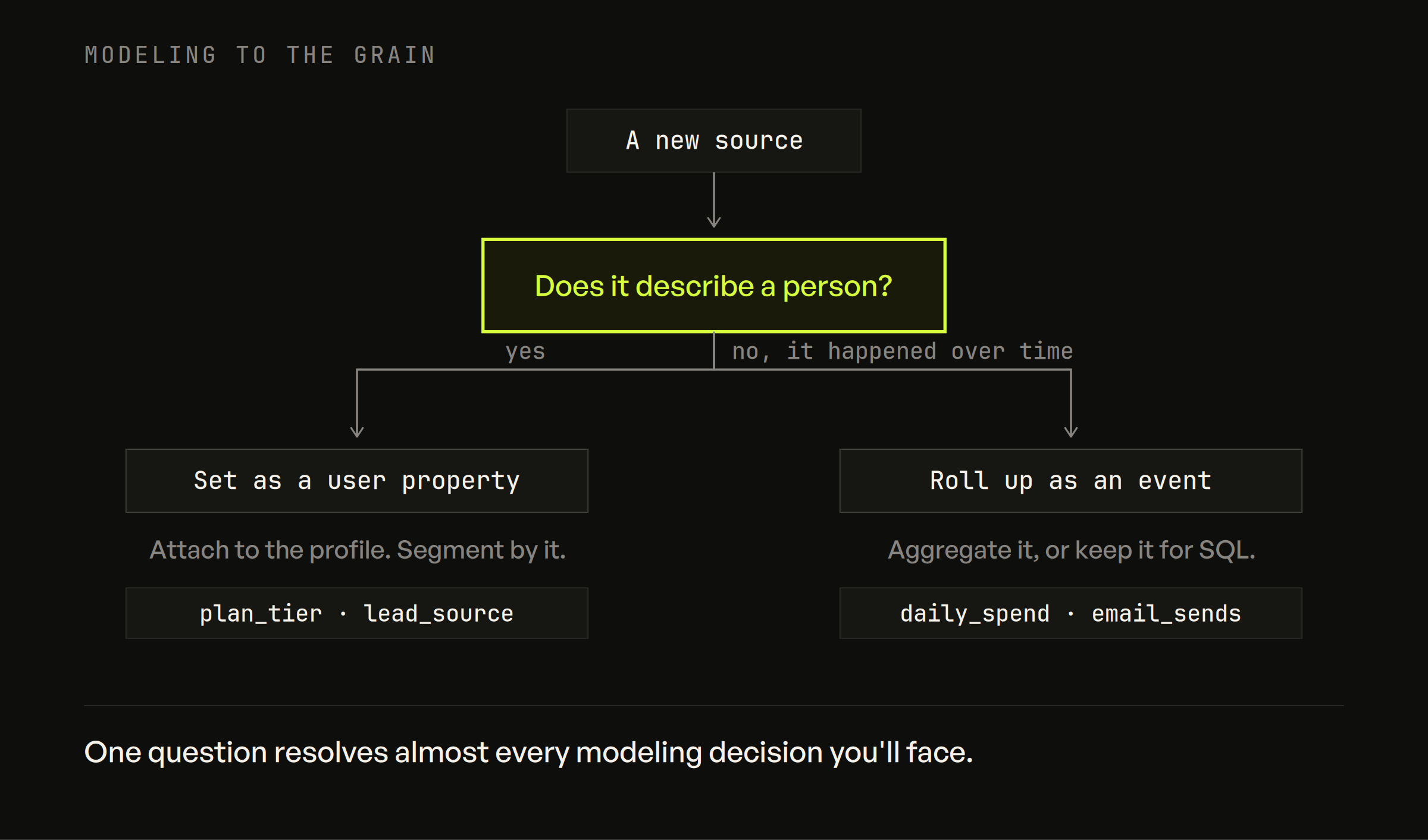
Any source you bring in has one of two destinations.
User-level. If the data describes a person, attach it to that person's profile as a property, so you can segment by it. Plan tier from Stripe. Lead source and firmographics from your CRM. Now you can ask "how do users on the enterprise plan retain versus the self-serve ones" and get a real answer, because the plan is sitting on the profile.
Aggregated-event-level. If the data describes a thing that happened over time, roll it up and send it as an event, or leave it in the warehouse for SQL. Daily ad spend. Email sends. These aren't people, they're quantities, and forcing them onto a user profile makes no sense.
The rule of thumb: does this describe a person, or does it describe something that happened? That one question resolves almost every modeling decision you'll face here.
Ad data makes this concrete. A raw ad sync gives you one row per campaign per day, stuffed with dozens of fields you will never look at. Dumped into your analytics tool as-is, it's unreadable noise. So instead, in the warehouse, you model it down to one row per campaign per day with only the metrics you care about, spend, impressions, clicks. Then you sync that clean, aggregated event in. Now "what did we spend on this campaign" is one clear number sitting next to the users it brought, instead of forty columns of garbage nobody opens.
Picking the wrong path here is expensive to undo once tools are wired up. If you're not sure which of these is yours, book a call and I'll help you figure out the right shape before you build, not after.
How do you join marketing and product data?
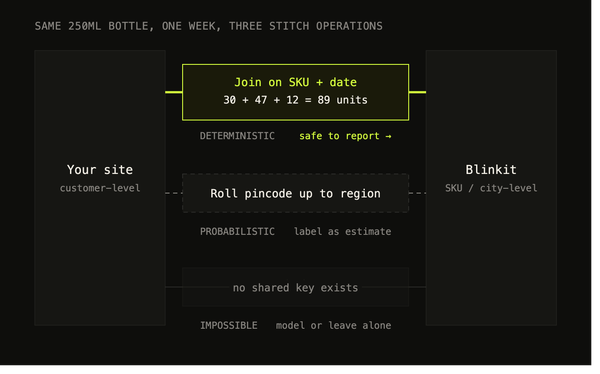
This is the step that turns "everything in one tool" into "one connected journey." The mechanism is a shared join key. For marketing and product data, that key is almost always the campaign.
Your product analytics tool automatically captures UTM parameters the first time a user lands, and stores them as properties on that user. Mixpanel, PostHog, and Amplitude all do this out of the box on the web. So if your campaign name or ID is set correctly in the UTM, that value ends up stamped on the user's profile at signup.
Your ad platform data carries that same campaign name or ID. That shared value is your join key. Model spend per campaign in the warehouse, key it on the campaign, and now the two sides line up. This campaign cost ₹X. It drove Y users. Of those, Z activated and stayed.
One warning, because this is where it silently falls apart. If your UTMs aren't set consistently, or the campaign IDs in your ad platform don't match what actually got captured on the user, the join produces nothing. No error, no warning, just empty results. Consistent naming between your ad platform and your UTMs is the boring discipline the whole thing depends on.
I've written the full walkthrough of stitching marketing and product data, the subdomain identity problem, the parent-domain cookie, the exact tool-by-tool defaults, in a separate post. If this is the part you care about most, read that next.
A silently empty join can cost you months of decisions made on nothing. If you want a second set of eyes on whether your marketing and product data actually line up, that's a good reason to talk.
A silently empty join can cost you months of decisions made on nothing. If you want a second set of eyes on whether your marketing and product data actually line up, that's a good reason to talk.
What can you finally see?
This is the payoff, and it's the whole reason you did the boring parts.
Once your data is trustworthy, unified, and joined, questions that were unanswerable last month become one query:
Which channel brings users who actually retain and pay, not just the channel that looks cheapest per signup. The channel with the lowest cost per signup turns out to bring users who never come back, while a more expensive channel quietly brings your best customers.
What one user did across the whole journey, from the ad they clicked to the marketing page they read to the feature they used to the plan they bought, as a single timeline instead of four disconnected records.
How different segments behave, cut by acquisition source, by plan, by the firmographics your CRM was holding the whole time.
This is roughly what I did with TermPlus, a fintech running on PostHog. Their setup was incomplete when we started, and their data was scattered across marketing, product, and backend systems, so nobody could see the full picture. We rebuilt the tracking, verified every event, and pulled their ad and HubSpot data into PostHog so it sat alongside product behavior. Once it was unified, the team could finally follow a user from acquisition through to conversion and retention in one place, instead of guessing at the handoffs between tools.
One habit to keep: re-verify once the data is joined. Joins break as quietly as tracking does. A campaign ID format changes, a UTM convention drifts, and suddenly a chunk of your unified view is empty and nobody notices for a month. Check it the same way you checked the raw tracking.
What's the one decision to get right?
If you take one thing from this, make it the choice between two paths.
Small, on PostHog, only a few sources to connect? Use the native warehouse and source connectors. It's fast, it's fine, and you don't need more machinery than that.
Several sources, real transformation to do, or you want a single source of truth that isn't locked inside one vendor? Go warehouse-first. BigQuery or Snowflake, dbt for the modeling, sync out to your tools. It's more to set up. It's also the thing that holds when you add the next tool, and the one after that, because every one of them drinks from the same clean source instead of adding a seventh half-picture to the pile.
Either way, the sequence is the same. Trust the data. Get it in. Model it to the grain. Join it on a real key. Verify it again. Skip a step and you'll feel it later, usually in a meeting where three people have three different numbers and no way to tell which one is right.
Frequently asked questions
Why don't I trust my own data even though I have all the tools?
Usually because you're tracking too much. If you're firing an event on every click and every button, that's the root problem, and it never scales. Fix what you already have before you connect a single new tool.
What is grain, and why does it matter?
The level of detail one row represents. Every source arrives at its own natural grain — ad spend per campaign per day, an event per user, an invoice per account — and you have to decide what each becomes. Getting the data in is where most people stop, then wonder why the unified setup still can't answer their questions.
What's the join key between marketing and product data?
The campaign. Your product analytics tool captures UTM parameters the first time a user lands and stores them as properties on that user. Your ad platform data carries the same campaign name or ID. Model spend per campaign in the warehouse, key it on that shared value, and the two halves connect.
Does the tool I'm on change how hard this is?
Considerably. How hard the unification is depends heavily on which product analytics tool you're already running — some bring the warehouse and connectors with them, others expect you to stand that up yourself.
What does a silently empty join cost?
Months of decisions made on nothing. A join that returns no rows doesn't throw an error — the dashboard just quietly shows less than it should, and nobody notices until someone checks the arithmetic by hand.
Want this on your own stack?
Datalyze rebuilds your data foundation, then finds the growth it's been hiding — proven across 150+ startups.
Book a free analytics audit →